
CHAP
The Challenge Handshake Authentication Protocol (CHAP) authenticates PPP clients without sending the user’s password over the wire. The mods-available/chap configuration file specifies the parameters used by the CHAP module. This document explains how to configure and test CHAP authentication in FreeRADIUS.
CHAP Authentication Flow
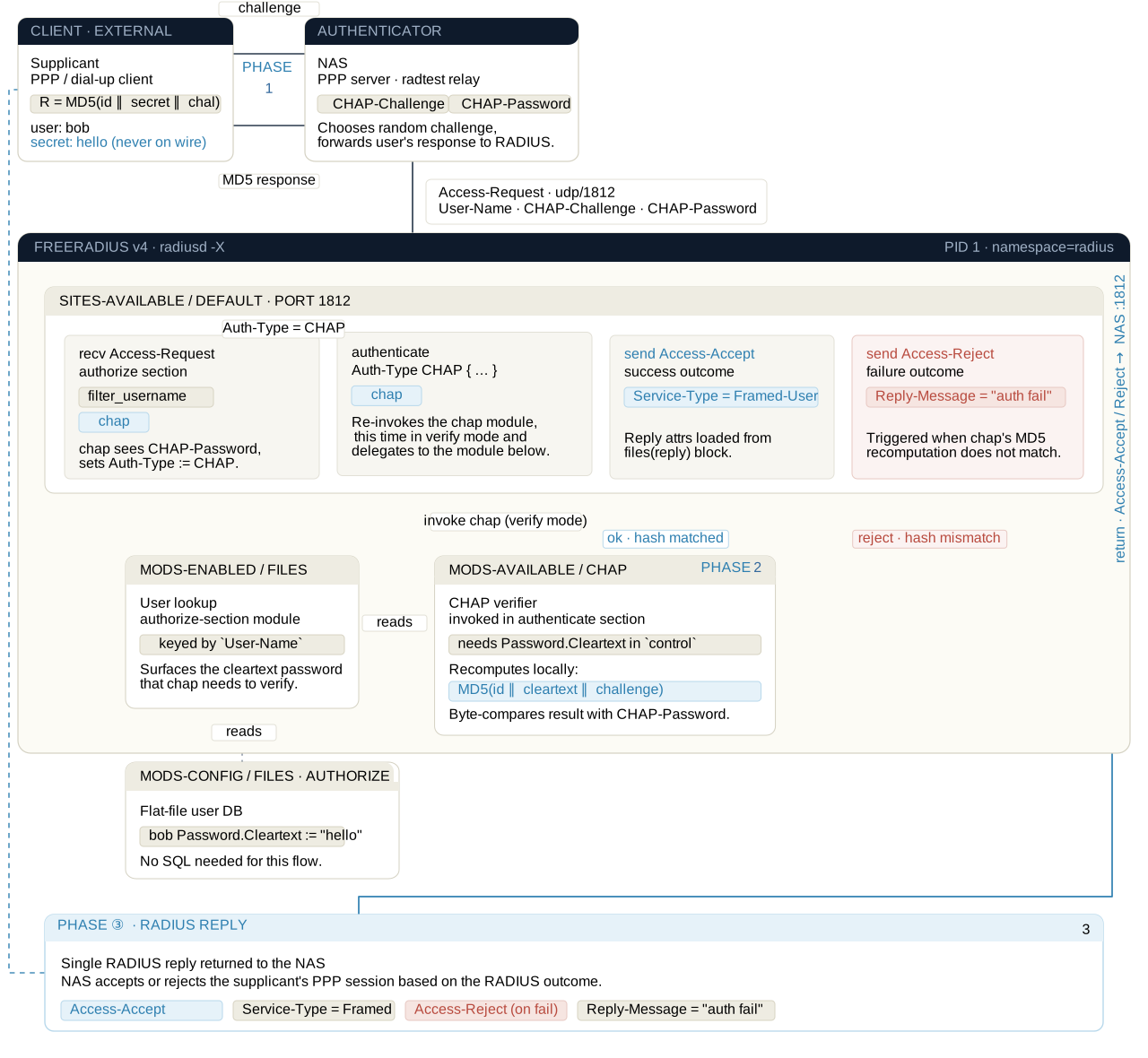
CHAP authentication happens in three stages. The NAS sends a challenge to the client via PPP. The client responds with a hash of the password and the challenge. The NAS then sends the hash and challenge to the RADIUS server in an Access-Request.
FreeRADIUS reads the clear-text password from a database, and then hashes that using the same challenge. If the two hashes match, then the user has used the correct password. Otherwise, a reject is returned.
Verify the Server Configuration
The default server configuration can be tested with this command:
radiusd -XCIf the configuration is correct, then the server will print the following message:
Configuration appears to be OKIf that message does not appear, then it is necessary to correct any and all errors before proceeding to the next step. It is a good idea to ensure that the current configuration works before making changes to it.
Edit mods-available/chap
The mods-available/chap module contains no configuration items, and does not need to be edited.
Enable mods-available/chap
The default installation will automatically enable the chap module.
In most circumstances, no additional work is required.
The chap module is enabled by creating a soft link from the
mods-enabled/ directory to the mods-available/ directory.
cd raddb/mods-enabled && ln -s ../mods-available/chapConfigure the CHAP module in a Virtual Server
The chap module must be referenced in two sections of the virtual
server. Both sections are present in the default
sites-available/default virtual server.
Configure recv Access-Request
The chap module must be called in the recv Access-Request { … }
section. When a request arrives containing a CHAP-Password
attribute, the module looks for CHAP-Password in the request. If
that attribute exists, the module sets Auth-Type := ::CHAP.
The server then calls the authenticate chap { … } section later in
processing, in order to authenticate the user.
recv Access-Request {
    ...
    chap
    ...
}
You must also configure a database module which retreives the "known
good" password for the user. This password must be placed into the
Password.Cleartext attribute.
Due to the limitations of CHAP, other password formats are not supported. For example, "salted" or "crypted" passwords are not compatible with CHAP authentication.
See the protocol compatibility chart for more information.
Configure authenticate chap
The chap module must also appear in the authenticate chap { … }
section. This section is called when Auth-Type is set to CHAP.
The module retrieves the Password.Cleartext that has been placed
into the request by a database module (such as files, sql, or
ldap), and then verifies the CHAP data which was supplied in the
Access-Request packet.
authenticate chap {
    chap
}
Password.Cleartext must be set before the authenticate chap {
… } section is run, otherwise authentication will fail.
Disabling CHAP
You can disable the chap module by removing the soft link from the
mods-enabled/ directory. You must then also remove all references
to chap from the virtual servers.
The chap module should be removed from the recv Access-Request {
… } section, and the authenticate chap { … } section should be
deleted.
The server will then refuse to do CHAP authentication. All
Access-Request packets that contain a CHAP-Password attribute will
then result in an Access-Reject.
Security
We do not recommend enabling the CHAP module. If the
CHAP-Password and CHAP-Challenge attributes are sent in
RADIUS/UDP, then they are vulnerable to off-line dictionary attacks.
Anyone who can see the CHAP data can discover the users clear-text
password in a few milliseconds.
In contrast, PAP (User-Password) is significantly more secure.
Testing
Confirm that your server configuration works before proceeding to test
CHAP functionality. Then, see the
testing page for specific instructions
on how to test the chap module.