
Proxy Receive
Goal: Configure the server to handle local authentication and proxy requests to different remote RADIUS servers based on the user-name (realm) suffix.
Time: 15-25 minutes
Files to create or edit:
-
mods-available/proxy-realm1 -
mods-available/proxy-realm2 -
mods-enabled/proxy-realm1(symlink) -
mods-enabled/proxy-realm2(symlink) -
clients.conf -
sites-enabled/default
Diagram:
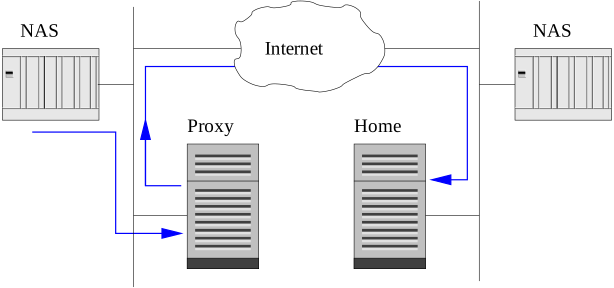
Prerequisites:
-
You already have a working second FreeRADIUS server (the "home" server) running on another machine / IP.
-
It accepts authentication on port 1812 with a known shared secret.
-
It can authenticate users like
bobwith passwordhello.
Configure your proxy server to:
-
Authenticate
boblocally using thefilesmodule -
Proxy
bob@realm1.comto remote server 1 -
Proxy
bob@realm2.comto remote server 2
You can use the radclient commands shown in the Testing section to simulate the authentication requests.
1. Create the proxy modules
Create the file mods-available/proxy-realm1 and add the following configuration.
# Proxies requests for @realm1.com to remote server 1

radius proxy-realm1 {
    mode = proxy
    transport = udp

    udp {
        # replace with real IP of realm1 server
        ipaddr = 192.168.100.51
        port   = 1812
        secret = testing123
    }

    type = Access-Request
    type = Accounting-Request

    status_check = none

    connect_timeout  = 3.0
    response_timeout = 3.0
    zombie_period    = 40
}
Create the file mods-available/proxy-realm2 and add the following configuration.
# Proxies requests for @realm2.com to remote server 2

radius proxy-realm2 {
    mode = proxy
    transport = udp

    udp {
        # replace with real IP of realm2 server
        ipaddr = 192.168.100.52
        port   = 1812
        secret = testing123
    }

    type = Access-Request
    type = Accounting-Request

    status_check = none

    connect_timeout  = 3.0
    response_timeout = 3.0
    zombie_period    = 40
}
Enable both modules by creating symlinks / softlinks in the mods-enabled directory.
$ cd ../mods-enabled
$ ln -s ../mods-available/proxy-realm1 .
$ ln -s ../mods-available/proxy-realm2 .
2. Register remote servers as clients
Edit clients.conf and add:
client realm1_remote {
    # same IP as proxy-realm1
    ipaddr = 192.168.100.51
    secret = testing123
    shortname = realm1-server
    nas_type = other
}

client realm2_remote {
    # same IP as proxy-realm2
    ipaddr = 192.168.100.52
    secret = testing123
    shortname = realm2-server
    nas_type = other
}
3. Modify the virtual server logic to control when to proxy
Edit sites-enabled/default file with the following configuration.
Update the recv Access-Request { … } section:
recv Access-Request {
    if (&User-Name =~ /@realm1\.com$/) {
        proxy-realm1

        if (ok) {
            accept
        }
    }
    elsif (&User-Name =~ /@realm2\.com$/) {
        proxy-realm2

        if (ok) {
            accept
        }
    }
    else {
        files
        pap
    }
}
Update (or add) the authenticate section:
authenticate PAP {
        pap
    }

authenticate proxy-realm1 {
        proxy-realm1
    }

authenticate proxy-realm2 {
        proxy-realm2
    }
4. Verify that the local user exists
In mods-config/files/authorize (or your users file):
bob Cleartext-Password := "hello"If the user doesn’t exist, add the user to the authorize file as you did in the New User tutorial.
5. Testing
Run server in debug mode:
$ radiusd -XAll radclient tests below assume secret = testing123
Local user (no realm)
echo 'User-Name = "bob", User-Password = "hello"' | radclient -x 127.0.0.1 auth testing123-
Radclient output:
Sent Access-Request Id 200 from 0.0.0.0:58423 to 127.0.0.1:1812 length 61
  Message-Authenticator = 0x
        User-Name = "bob"
        User-Password = "hello"
Received Access-Accept Id 200 from 127.0.0.1:1812 to 0.0.0.0:58423 via lo length 43
        Message-Authenticator = 0x31d0d6a1aba5a83a6d77b4187c0562a5
User-Name = "bob"-
Server debug output (main / proxy server – local user):
(0)      if (User-Name =~ /@realm1\.com$/)  {
(0)        | =~
(0)            | User-Name
(0)              | %{User-Name}
(0)              | --> bob
(0)        | ({bob} =~ (null))
(0)        | --> false
(0)        ...
Details
(0)      }
(0)      else {
(0)          files - | ||
(0)          files - | %logical_or()
(0)            files - | Stripped-User-Name
(0)              files - | %{Stripped-User-Name}
(0)              files - (null)
(0)            files - | User-Name
(0)            files - | %logical_or(...)
(0)              files - | %{User-Name}
(0)              files - | --> bob
(0)            files - | %logical_or(...)
(0)            files - | --> bob
(0)        files - files - Looking for key "bob"
(0)        files - files - Found match "bob" on line 1 of ../mods-config/files/authorize
(0)        files - files - Preparing attribute updates:
(0)          files - Password.Cleartext := hello
(0)        files (ok)
Proxy to realm1.com
echo 'User-Name = "bob@realm1.com", User-Password = "hello"' | radclient -x 127.0.0.1 auth testing123-
Radclient output:
Sent Access-Request Id 130 from 0.0.0.0:43437 to 127.0.0.1:1812 length 72
  Message-Authenticator = 0x
        User-Name = "bob@realm1.com"
        User-Password = "hello"
Received Access-Accept Id 130 from 127.0.0.1:1812 to 0.0.0.0:43437 via lo length 54
        Message-Authenticator = 0x591568951632aae69f913f707912e464
User-Name = "bob@realm1.com"-
Server debug output (main / proxy server – proxied user):
(0)      if (User-Name =~ /@realm1\.com$/)  {
(0)        | =~
(0)            | User-Name
(0)              | %{User-Name}
(0)              | --> bob@realm1.com
(0)        | ({bob@realm1.com} =~ (null))
(0)        | --> true
(0)        proxy-realm1 - proxy-realm1 - [1] Trunk connection assigned request 1
Details
(0)        proxy-realm1 - Sending Access-Request ID 0 length 0 over connection proto udp local 10.0.16.96 port 37726 remote 44.222.160.231 port 1812
(0)          proxy-realm1 - Message-Authenticator = 0xb8c474a818edf42917887303b3181172
(0)          proxy-realm1 - User-Name = "bob@realm1.com"
(0)          proxy-realm1 - User-Password = "hello"
(0)          proxy-realm1 - Packet {
(0)            proxy-realm1 - Id = 130
(0)            proxy-realm1 - Authenticator = 0x970cd7fde6e8fefc4d155017d1a0bed1
(0)          proxy-realm1 - }
(0)          proxy-realm1 - Packet-Type = ::Access-Request
(0)          proxy-realm1 - Proxy-State = 0x6836cf35495baced
(0)        proxy-realm1 - Proxied request.  Relying on NAS to perform more retransmissions
(0)        proxy-realm1 - Received Access-Accept ID 0 length 48 reply packet on connection proto udp local 10.0.16.96 port 37726 remote 44.222.160.231 port 1812
(0)          proxy-realm1 - Message-Authenticator = 0xb0438c94e081c9c66b194a770b38bd5f
(0)          proxy-realm1 - Proxy-State = 0xedac5b4935cf3668
(0)        proxy-realm1 - proxy-realm1 - Resuming execution
(0)        proxy-realm1 (ok)
-
Proxy server debug output (when proxied packet arrives):
(0) suffix: Checking for suffix after "@"
(0) suffix: Looking up realm "realm1.com" for User-Name = "bob@realm1.com"
(0) suffix: Found realm "default"
(0) suffix: Adding Stripped-User-Name = "bob"
(0) suffix: Adding Realm = "default"
(0) suffix: Authentication realm is LOCAL
(0)     [suffix] = ok
Details
(0) files: users: Matched entry bob at line 2
(0)     [files] = ok
(0)     [pap] = updated
(0)   } # authorize = updated
(0) Found Auth-Type = PAP
(0) # Executing group from file ../sites-enabled/default
(0)   Auth-Type PAP {
(0)     [ok] = ok
(0)   } # Auth-Type PAP = ok
Proxy to realm2.com
echo 'User-Name = "bob@realm2.com", User-Password = "hello"' | radclient -x 127.0.0.1 auth testing123-
Radclient output:
Sent Access-Request Id 130 from 0.0.0.0:43437 to 127.0.0.1:1812 length 72
  Message-Authenticator = 0x
        User-Name = "bob@realm2.com"
        User-Password = "hello"
Received Access-Accept Id 130 from 127.0.0.1:1812 to 0.0.0.0:43437 via lo length 54
        Message-Authenticator = 0x591568951632aae69f913f707912e464
User-Name = "bob@realm2.com"-
Server debug output (main / proxy server – proxied user):
(0)      if (User-Name =~ /@realm2\.com$/)  {
(0)        | =~
(0)            | User-Name
(0)              | %{User-Name}
(0)              | --> bob@realm2.com
(0)        | ({bob@realm2.com} =~ (null))
(0)        | --> true
Details
(0)        proxy-realm2 - proxy-realm2 - [1] Trunk connection assigned request 1
(0)        proxy-realm2 - Sending Access-Request ID 0 length 0 over connection proto udp local 10.0.16.96 port 37726 remote 44.222.160.231 port 1812
(0)          proxy-realm2 - Message-Authenticator = 0xb8c474a818edf42917887303b3181172
(0)          proxy-realm2 - User-Name = "bob@realm2.com"
(0)          proxy-realm2 - User-Password = "hello"
(0)          proxy-realm2 - Packet {
(0)            proxy-realm2 - Id = 130
(0)            proxy-realm2 - Authenticator = 0x970cd7fde6e8fefc4d155017d1a0bed1
(0)          proxy-realm2 - }
(0)          proxy-realm2 - Packet-Type = ::Access-Request
(0)          proxy-realm2 - Proxy-State = 0x6836cf35495baced
(0)        proxy-realm2 - Proxied request.  Relying on NAS to perform more retransmissions
(0)        proxy-realm2 - Received Access-Accept ID 0 length 48 reply packet on connection proto udp local 10.0.16.96 port 37726 remote 44.222.160.231 port 1812
(0)          proxy-realm2 - Message-Authenticator = 0xb0438c94e081c9c66b194a770b38bd5f
(0)          proxy-realm2 - Proxy-State = 0xedac5b4935cf3668
(0)        proxy-realm2 - proxy-realm2 - Resuming execution
(0)        proxy-realm2 (ok)
-
Proxy server debug output (when proxied packet arrives):
(0) suffix: Checking for suffix after "@"
(0) suffix: Looking up realm "realm2.com" for User-Name = "bob@realm2.com"
(0) suffix: Found realm "default"
(0) suffix: Adding Stripped-User-Name = "bob"
(0) suffix: Adding Realm = "default"
(0) suffix: Authentication realm is LOCAL
(0)     [suffix] = ok
Details
(0) files: users: Matched entry bob at line 2
(0)     [files] = ok
(0)     [pap] = updated
(0)   } # authorize = updated
(0) Found Auth-Type = PAP
(0) # Executing group from file ../sites-enabled/default
(0)   Auth-Type PAP {
(0)     [ok] = ok
(0)   } # Auth-Type PAP = ok