
Other protocols within RADIUS: EAP-MD5
Goal: To configure the server to use the EAP-MD5 authentication protocol and to send and receive test packets.
Time: 10-15 minutes.
File:
-
mods-available/eap -
mods-config/files/authorize -
sites-enabled/default -
eapol_test.conf
Overview: What Is EAP-MD5?
EAP (Extensible Authentication Protocol) is a protocol which carries
other authentication protocols inside it. Think of it like an
envelope: the envelope itself doesn’t contain the message, it just
delivers it. EAP-MD5 is one of the protocols that gets carried
inside that envelope.
In EAP-MD5, the server doesn’t ask for a password directly. Instead it sends a random challenge, and the client responds with an MD5 hash of that challenge combined with their password. The server runs the same calculation and checks if the results match. The password never crosses the network, only the hash does.
For this exercise, your are assumed to have previously worked
through and be familiar with the exercise in New User for
user bob.
Diagram:
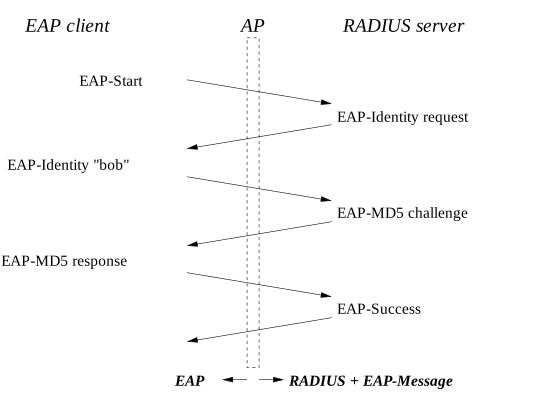
In this setup, EAP runs inside RADIUS, in the EAP-Message
attribute. Instead of using NAS (e.g. a switch or access point), we
use the command-line tool eapol_test acts as a relay which wraps
EAP packets into RADIUS messages and passes them to FreeRADIUS.
Configuration
Step 2: Configure the EAP Module
In mods-enabled/eap, set require_identity_realm = no since we are
not using realm-based authentication:
eap {
    ...
    require_identity_realm = no
    ...
}
Step 3: Configure the Default Site
In sites-enabled/default, ensure that it has the following
configuration:
recv Access-Request {
    ...
    files
    ...
    eap {
        ok = return
        updated = return
    }
    ...
}

authenticate eap {
    eap
}
Step 4: Create the eapol_test Config File
Create a file called eap-md5.conf with the following content:
network={
    key_mgmt=NONE
    eap=MD5
    identity="bob"
    password="hello"
}
Note: We have to specific key_mgmt=NONE because EAP-MD5 does not
derive the encryption keys used for normal Wi-Fi authentication.
Step 5: install the eapol_test
Make sure to install eapol_test program before proceeding.
TBD: Add how to install eapol_test on different operating systems
Expected Output
The eapol_test program should have output which ends with the
following text:
CTRL-EVENT-EAP-SUCCESS EAP authentication completed successfully
EAPOL: IEEE 802.1X for plaintext connection; no EAPOL-Key frames required
WPA: EAPOL processing complete
Cancelling authentication timeout
State: DISCONNECTED -> COMPLETED
EAPOL: SUPP_PAE entering state AUTHENTICATED
EAPOL: SUPP_BE entering state RECEIVE
EAPOL: SUPP_BE entering state SUCCESS
EAPOL: SUPP_BE entering state IDLE
eapol_sm_cb: result=1
EAPOL: EAP key not available
EAPOL: EAP Session-Id not available
WPA: Clear old PMK and PTK
EAP: deinitialize previously used EAP method (4, MD5) at EAP deinit
MPPE keys OK: 0  mismatch: 0
SUCCESS- Reading the server debug output
-
The server processes two RADIUS packets. Here is what happens in each:
Packet 0 - Identity + Challenge
The client sends its identity bob. The server finds the user in the
files module, runs the eap module which recognises the EAP packet.
The eap module then calls the eap_md5 submodule which issues the
MD5 challenge. The server replies with Access-Challenge.
(0)        files - | ||
(0)        files - | %logical_or()
(0)          files - | Stripped-User-Name
(0)            files - | %{Stripped-User-Name}
(0)            files - (null)
(0)          files - | User-Name
(0)          files - | %logical_or(...)
(0)            files - | %{User-Name}
(0)            files - | --> bob
(0)          files - | %logical_or(...)
(0)          files - | --> bob
(0)      files - files - Looking for key "bob"
(0)      files - files - Found match "bob" on line 1 of raddb/mods-config/files/authorize
(0)      files - files - Preparing attribute updates:
(0)        files - Password.Cleartext := hello
(0)      files (ok)
(0)      eap - Peer sent EAP Response (code 2) ID 152 length 8
(0)      eap - Peer sent EAP-Identity.  Returning 'ok' so we can short-circuit the rest of authorize
(0)      eap - Setting control.Auth-Type = ::eap
(0)      eap (ok)
.......
(0)    authenticate eap {
(0)      eap - New EAP session started
(0)      eap - Peer sent packet with EAP method Identity (1)
(0)      eap - Calling submodule eap_md5
(0)      eap - subrequest {
(0.0)      eap.md5 - Issuing MD5 Challenge
(0.0)      eap.md5 (handled)
(0)        eap - subrequest - Resuming execution
(0)      eap - } # subrequest (...)
(0)      eap - Sending EAP Request (code 1) ID 153 length 22
(0)      eap (handled)
(0)    } # authenticate eap ((handled))
(0)    Running 'send Access-Challenge' from file raddb/sites-enabled/default
.......
(0)  Sending Access-Challenge ID 0 from 0.0.0.0/0:1812 to 127.0.0.1:39463 length 80 via socket radius_udp server * port 1812
(0)    EAP-Message = 0x01990016041072fc48767c7df1a691ee25e9e2a7f26f
(0)    Message-Authenticator = 0x00000000000000000000000000000000
(0)    State = 0x01011f001bd307851b431fb58dd9e241
(0)    Packet-Type = ::Access-Challenge
(0)  Finished request
Packet 1 - Response + Verification
The client returns its MD5 hash of the password and the challenge. The
server loads the cleartext password, runs the same MD5 computation,
and compares the results. On success it sends Access-Accept.
(1)        files - | ||
(1)        files - | %logical_or()
(1)          files - | Stripped-User-Name
(1)            files - | %{Stripped-User-Name}
(1)            files - (null)
(1)          files - | User-Name
(1)          files - | %logical_or(...)
(1)            files - | %{User-Name}
(1)            files - | --> bob
(1)          files - | %logical_or(...)
(1)          files - | --> bob
(1)      files - files - Looking for key "bob"
(1)      files - files - Found match "bob" on line 1 of raddb/mods-config/files/authorize
(1)      files - files - Preparing attribute updates:
(1)        files - Password.Cleartext := hello
(1)      files (ok)
(1)      eap - Peer sent EAP Response (code 2) ID 153 length 22
(1)      eap - Continuing on-going EAP conversation
(1)      eap - Setting control.Auth-Type = ::eap
(1)      eap (updated)
.......
(1)      eap - Continuing EAP session
(1)      eap - Peer sent packet with EAP method MD5 (4)
(1)      eap - Calling submodule eap_md5
(1)      eap - subrequest {
(1)        eap - Using "known good" cleartext password Cleartext
(1.0)      eap.md5 (ok)
(1)        eap - subrequest - Resuming execution
(1)      eap - } # subrequest (...)
(1)      eap - Sending EAP Success (code 3) ID 153 length 4
(1)      eap - Cleaning up EAP session
(1)      eap (ok)
.......
(1)  Sending Access-Accept ID 1 from 0.0.0.0/0:1812 to 127.0.0.1:39463 length 49 via socket radius_udp server * port 1812
(1)    EAP-Message = 0x03990004
(1)    Message-Authenticator = 0x00000000000000000000000000000000
(1)    Packet-Type = ::Access-Accept
(1)    User-Name = "bob"
Questions
-
In which of the following sections is the
eapmodule used?recv Access-Request,authenticate, orrecv Accounting-Request. -
Which of those sections do not reference the
eapmodule? Why? -
What is the difference (if any) between the server output for this test and the diagram below? Why is there a difference? image::eap_md5.svg[Fig. EAP-MD5]
-
Why do we test EAP-MD5 before testing other EAP types?
-
How is the EAP protocol carried within a RADIUS packet?
-
Why is the
Message-Authenticatorattribute required when using EAP? -
What security issues exist with EAP-MD5?
-
Why is EAP-MD5 disabled in newer operating systems?